How to Catch Silent dbt Test Failures Before They Hit Dashboards
dbt tests fail silently more often than they fail loudly. Warn-severity tests, skipped models, freshness gaps, and tests that only run in CI all let bad data through without paging anyone. This guide covers the patterns that hide failures and how to catch them.
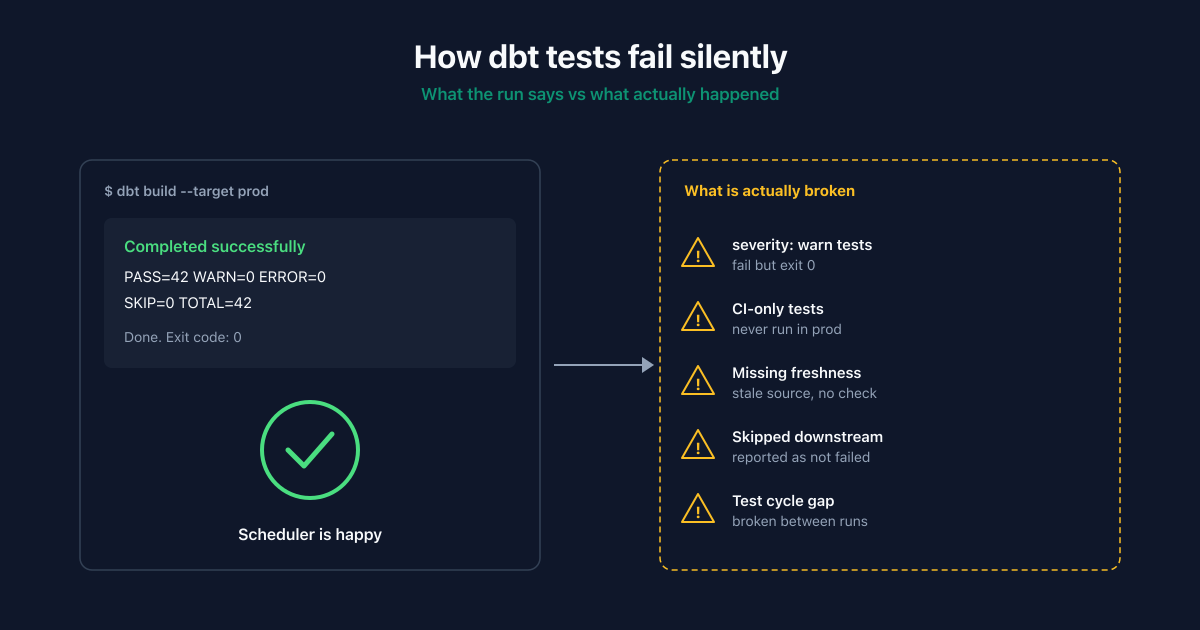
dbt tests fail silently when a test runs, returns a problem, and no one notices. The four most common causes are tests configured with severity: warn, tests that run only in CI and not on production refreshes, freshness checks that never get configured, and upstream model failures that skip downstream tests entirely without flagging them as gaps in coverage. Catching silent failures means closing those gaps explicitly, not assuming dbt test exit codes cover them.
I run a data quality tool, so this is a biased source. But the failure patterns below are independent of any tool, including mine. The right starting point is closing the gaps with dbt itself; layering a continuous monitor on top is only worth it once you have done that.
Why do dbt tests fail silently?
dbt's testing model is built around the assumption that you run tests, read the output, and act on failures. In practice, production dbt deployments accumulate configurations that quietly remove the second and third steps.
Here are the five patterns that account for most silent failures in production.
| Pattern | What it looks like | Why it stays silent |
|---|---|---|
severity: warn tests |
Test fails, dbt logs a warning, exit code is 0 | Schedulers only alert on non-zero exits |
| CI-only tests | dbt test runs on PRs, not on production refreshes |
Production data is never tested against the rules |
| Missing freshness checks | dbt source freshness not configured for raw sources |
Stale data flows through and no test ever runs |
| Skipped downstream tests | Upstream model fails, downstream tests are skipped | Skipped is reported as "not failed" |
| Tests on stale snapshots | Tests assert against the last successful build, not current | Tests pass on yesterday's data while today's is broken |
The pattern is consistent: each individual configuration is defensible. Combined across a real production deployment with dozens of contributors and hundreds of models, they leave a coverage gap most teams do not realize they have.
How do severity: warn tests hide failures?
dbt tests have two severity levels: error (default) and warn. A test configured as warn will run, log the failure, and exit cleanly. The job succeeds. The orchestrator considers the run healthy.
# models/marts/orders.yml
version: 2
models:
  - name: fct_orders
    columns:
      - name: order_total
        tests:
          - not_null:
              severity: warn
          - dbt_utils.accepted_range:
              min_value: 0
              max_value: 100000
              severity: warn
This configuration is common. It is added when a test starts failing intermittently, the team does not have time to fix the root cause, and downgrading severity makes the noise stop. The test still runs. The failures are still recorded in dbt.log and the run artifacts. But the production alerting only fires on dbt test exiting non-zero, so no one sees them.
How to catch this: Audit your codebase for severity: warn and decide each one explicitly. Either upgrade it back to error and fix the root cause, delete the test if the rule is no longer valid, or pipe the warnings into your alerting system so they are not invisible.
# Find every severity: warn in your dbt project
grep -rn "severity: warn" models/
A practical rule: severity: warn is acceptable only if there is a documented owner and a follow-up issue. Otherwise it is a dead test.
Why do CI-only tests miss production failures?
A common deployment pattern looks like this: dbt test runs on every pull request as a CI check, and dbt run runs on a production schedule (Airflow, Dagster, dbt Cloud) without dbt test. The intent is to keep production runs fast.
The problem: PRs test the rules against a development warehouse with sample data. The production warehouse runs against live data without testing it. A new column of garbage that arrives from an upstream source on a Tuesday morning will never trigger any of your tests, because production never runs them.
How to catch this: Add dbt test (or at minimum dbt build, which interleaves run and test) to your production schedule. The right granularity is per-model: test a model after it builds, not all models at the end.
# Production schedule: build and test together
dbt build --select fct_orders+ --target prod
dbt build runs each model's tests immediately after it builds, so a failure stops dependent models from building on broken data. dbt run followed by dbt test at the end gives you a "tests failed but everything ran" outcome, which is worse than the failure stopping the chain.
What happens when source freshness is not configured?
Source freshness is the single most underused feature in dbt. Configured properly, it catches stale upstream data before any model runs against it. Configured by default, it does not run, which means a frozen source produces models that look healthy because the underlying assertions never check whether the source updated.
# models/sources/orders.yml
version: 2
sources:
  - name: raw
    tables:
      - name: orders
        loaded_at_field: ingested_at
        freshness:
          warn_after: {count: 6, period: hour}
          error_after: {count: 24, period: hour}
With this configuration, dbt source freshness will warn if ingested_at is older than 6 hours and fail if older than 24. Without it, a Fivetran sync that broke last Friday will continue to feed yesterday's data to today's models, and every downstream test will pass on stale-but-internally-consistent data.
How to catch this: Configure freshness on every raw source, not just the important ones. Run dbt source freshness as a separate scheduled step before dbt build and fail loud when it fails. For sources where the team does not know the right SLA, start with warn_after: 24 hours, error_after: 72 hours and tighten from there.
This is the single highest-leverage change most production dbt deployments can make. Data freshness monitoring covers the broader question of catching staleness across sources that are not in dbt at all.
Why do skipped tests look like passing tests?
When an upstream model fails to build, dbt skips downstream models and skips their tests. The summary line at the end of a run looks like this:
Completed with 1 error and 0 warnings:
  Failure in model dim_customers
Done. PASS=42 WARN=0 ERROR=1 SKIP=18 TOTAL=61
A scheduler that alerts on ERROR > 0 catches this. A scheduler that only checks the exit code catches it. The trap is that 18 tests were skipped, not run, and if your dashboard or monitoring focuses on test failures rather than total coverage, you may not notice that two thirds of your test surface did not execute today.
How to catch this: Treat SKIP as a coverage gap, not a non-event. After every production run, log PASS + SKIP + ERROR versus expected total. A run where 30% of tests were skipped because of an upstream failure is a worse incident than a run where 3 tests failed, because you have no signal on the skipped surface at all.
The dbt artifact (target/run_results.json) contains per-node status. A small script that parses it and reports skipped counts to your monitoring system is twenty lines of Python.
How do you catch failures between dbt runs?
dbt tests run when dbt runs. If your production schedule is every 6 hours and a schema change happens 10 minutes after a successful run, the next test execution is 5 hours 50 minutes away. Anything that consumes the affected table in the meantime gets bad data.
This is the limitation that no amount of dbt configuration solves: dbt is a batch tool, and its tests are batch tests. They are excellent at proving a model built correctly at the moment it built. They cannot tell you anything about the state of your warehouse between builds.
For the gap between runs, you need a continuous monitor: a system that polls the warehouse on its own schedule, independent of dbt, and detects schema changes, freshness gaps, or anomalies as they happen rather than at the next test cycle. Schema drift monitoring covers the schema half of this; data pipeline monitoring covers the freshness and volume half.
A practical audit for silent dbt failures
If you have not done this before, this is the audit I would run before adding any new tool. An hour of grep and a careful read of one run's artifacts will close more gaps than most tools you could buy.
Step 1: Inventory severity overrides.
grep -rn "severity:" models/ | grep -v "severity: error"
For each one, decide: upgrade, delete, or document with an owner.
Step 2: Check whether production runs tests.
Open your production orchestrator. Find the dbt task. Confirm it is dbt build (or dbt run && dbt test), not just dbt run. If it is just dbt run, that is your highest-leverage fix.
Step 3: Check freshness coverage.
grep -l "freshness:" models/sources/
Compare against your full list of sources. Any source without a freshness block is a coverage gap.
Step 4: Parse run_results.json from the last week.
Count skipped tests per run. A pattern of high SKIP counts means an upstream model is failing repeatedly and dragging large parts of your test surface offline without anyone noticing.
Step 5: Time-box the test cycle vs. the data cycle.
If production data updates every 15 minutes and dbt tests run every 6 hours, the gap is structural. Either tighten the test schedule or add a continuous monitor for the gap.
When do you need a tool beyond dbt tests?
Be honest about this. For a warehouse with 50 models, a disciplined team, and the audit above completed, dbt tests are sufficient. You do not need a separate observability tool to catch silent failures; you need to stop creating them.
Beyond a certain scale the math changes:
- More than 100 models with multiple contributors
- Upstream sources outside your control (third-party SaaS, partner feeds)
- Data updates more frequently than your test schedule
- A schema change in production caused a real incident in the last quarter
- You cannot answer "what is the freshness of every source right now" without writing custom SQL
At that point, a continuous monitor that runs independently of dbt and catches the gaps dbt cannot is doing work that would otherwise be a part-time job for someone on the team.
| Capability | dbt tests | Continuous data observability |
|---|---|---|
| Run during model build | Yes | No |
| Catch failures between builds | No | Yes |
| Detect schema changes in real time | No | Yes |
| Monitor source freshness | Yes (if configured) | Yes (automatic) |
| Track historical anomalies | No | Yes |
| Lineage and impact analysis | Partial (dbt docs) | Yes |
| Cost | Free (your compute) | Subscription |
The right shape is both: dbt tests for build-time correctness, a continuous monitor for the state of the warehouse between builds. They do not compete; they cover different windows.
Silent dbt failures FAQ
What is the difference between severity: warn and severity: error?
severity: error (the default) causes dbt to exit non-zero when the test fails, which surfaces as a failed job in your scheduler. severity: warn logs the failure but exits cleanly, so the scheduler considers the run successful and no alert fires. Use warn only when there is a documented owner and a plan to fix the underlying issue; otherwise it becomes a test that runs forever and tells no one when it fails.
How is dbt build different from dbt run followed by dbt test?
dbt build interleaves run and test per model: a model builds, its tests run immediately, and if a test fails, downstream models do not build. dbt run followed by dbt test runs every model first, then every test, so a model that produces bad data has already propagated to its dependents before the test catches it. For production schedules, prefer dbt build.
Why does dbt test pass when my data looks wrong?
The most common causes are: tests configured as severity: warn so failures do not exit non-zero; tests that target a different model than the one with the bad data; tests that only assert structural properties (not_null, unique) and miss content issues; or tests running against a snapshot that was built before the data went bad. Audit each in order.
Should source freshness checks fail the production job?
Yes for sources downstream models depend on. A model built on stale data is worse than no model at all, because consumers cannot tell the difference. Configure error_after aggressively for critical sources and let the job fail loudly.
How do I monitor dbt models that run more frequently than tests?
You cannot, with dbt alone. dbt tests run when dbt runs. The options are: increase test frequency to match run frequency (expensive if tests are slow), add a continuous monitor outside dbt that polls the warehouse independently, or accept the gap and document the SLA explicitly so consumers know the freshness of the test signal.
Does dbt Cloud catch silent failures better than dbt Core?
dbt Cloud has better default alerting and run history UIs than a bare dbt Core install, which makes some silent failures (like skipped tests) more visible. The underlying patterns above still apply. dbt Cloud does not automatically convert severity: warn failures into alerts, run tests in production schedules that are configured as run-only, or configure source freshness on sources that have no freshness block.
Do I still need a data observability tool if my dbt tests are clean?
For a small warehouse with a disciplined team, no. For a warehouse with sources outside dbt (operational databases, third-party SaaS exports, partner feeds), schema changes between test runs, or data update frequencies faster than test schedules, a continuous monitor catches the gaps dbt structurally cannot. The decision is about the gap between your test cycle and your data cycle, not the quality of your tests.
How do I find every place a test is being silenced in my project?
grep -rn "severity: warn" models/ finds severity overrides. Parsing target/run_results.json from recent runs surfaces tests in skipped state. Checking your orchestrator's dbt command surfaces whether tests are being run at all in production. Doing all three is usually enough to find every silenced test in a real project.
dbt tests are excellent at proving your models built correctly. They were never designed to monitor the state of your warehouse between builds. See how AnomalyArmor catches the gaps continuously across Snowflake, Databricks, and PostgreSQL.