How to Get Lineage From a dbt Manifest Without a Migration
Your dbt project already contains a complete dependency graph. It is sitting in target/manifest.json, and getting it out takes one command.
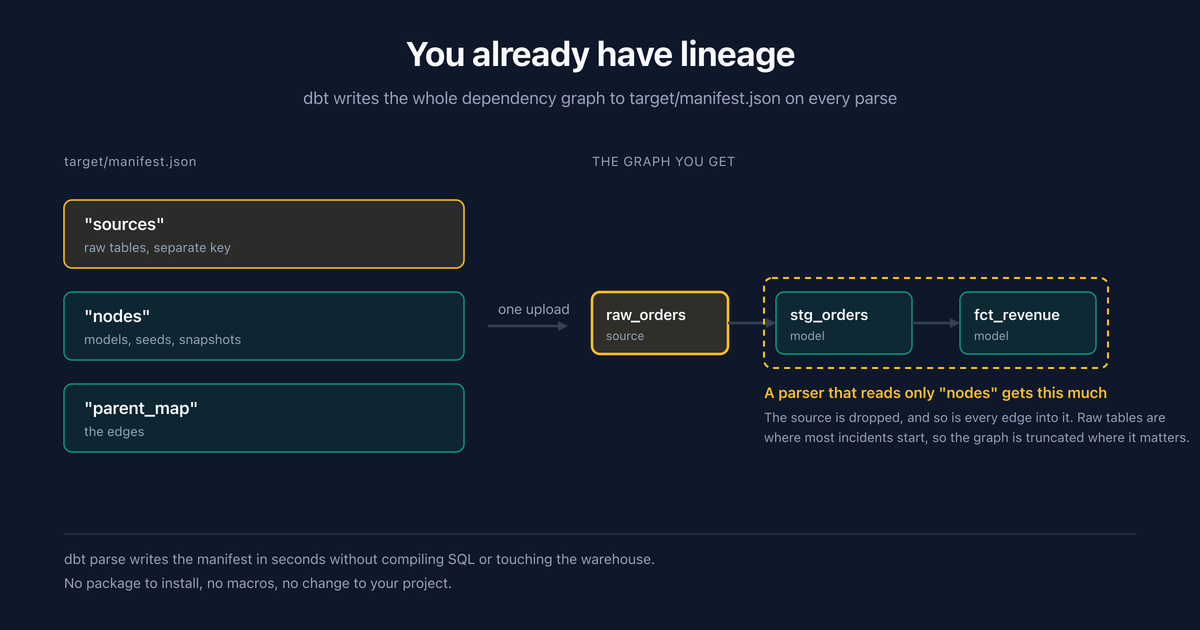
A dbt manifest is a JSON build artifact that describes every model, source, seed, and snapshot in your project, plus the dependency edges between them. It is a lineage graph you already produce, and most teams have never uploaded it anywhere.
That is the whole post. If you run dbt, you have lineage. The work is not building the graph, it is moving a file.
I want to be specific about the mechanics because "just upload your manifest" is the kind of advice that sounds complete and leaves out the four things that actually bite: which dbt command to run, whether sources come along, how the graph goes stale, and what happens to the parts of your warehouse dbt never touches.
What is actually inside manifest.json?
dbt writes it to target/manifest.json on every parse, compile, or run. It is large, often tens of megabytes on a real project, and almost all of that is compiled SQL you don't need for lineage.
The parts that matter are three keys:
nodes: every model, seed, snapshot, test, and analysis, keyed by a unique id likemodel.shop.stg_orders.sources: every table declared in asources:block, keyed likesource.shop.raw.orders. This is a separate top-level key, not part ofnodes, and that detail matters more than it should.parent_map: for each unique id, the list of ids it depends on. This is the graph.
There is also a child_map, which is parent_map inverted, and a metadata block with the dbt version, project name, and generation timestamp. That timestamp is the single most useful field for telling whether a graph is current.
Everything else is compiled code, docs, and config you can ignore for this purpose.
Which dbt command should you run?
Three commands write a manifest and they cost very different amounts.
| Command | What it does | Touches the warehouse | Use for lineage? |
|---|---|---|---|
dbt parse |
Parses the project into a manifest, no SQL compilation | No | Yes, this one |
dbt compile |
Parses and compiles SQL | Yes, needs a connection | Only if you were compiling anyway |
dbt run |
Full build | Yes, executes models | Only as a side effect of deploying |
dbt parse # writes target/manifest.json, seconds, no warehouse connection
dbt parse is the right answer and it is the one most guides skip. The graph is a function of your project's structure, not of running your models, so paying for a compile to obtain it is waste. On a large project the difference is seconds versus minutes, and in CI it is the difference between a step you can run on every merge and one you schedule around.
The exception is that you may already be running dbt run in a deploy pipeline, in which case the manifest is sitting there and you should just grab it.
How do you upload it?
One POST with the file as multipart form data.
curl -X POST \
  "https://api.anomalyarmor.ai/api/v1/assets/$ASSET_ID/lineage/upload" \
  -H "Authorization: Bearer $ARMOR_API_KEY" \
  -F "file=@target/manifest.json"
The response tells you what landed, which is the part worth reading rather than skipping:
{
  "data": {
    "sync_stats": {
      "nodes_created": 42,
      "nodes_updated": 8,
      "edges_created": 67,
      "edges_updated": 3
    },
    "manifest_metadata": {
      "generated_at": "2026-09-14T10:30:00Z",
      "dbt_version": "1.7.4",
      "project_name": "my_analytics"
    }
  }
}
Two habits worth forming. Check nodes_created against roughly what you expect, because a number that is far too low usually means you uploaded a run_results.json by mistake, and both files live in target/. And check generated_at, because a manifest from three weeks ago uploads perfectly happily.
There are limits: 50 MB, UTF-8 JSON, and the file must contain both nodes and parent_map or it is rejected. Most projects are nowhere near the size limit.
Why do sources matter more than models?
Here is the part I got wrong in our own product, so it comes with evidence.
dbt keeps sources in that separate sources key. Our manifest parser read nodes and nothing else, so every source table was dropped, and because the edge builder skips any edge whose parent isn't a known node, every source -> model edge went with them. Silently. No warning, no count in the response, nothing.
The result was a graph that started at your staging layer. stg_orders was there, fct_revenue was there, and the raw table they both ultimately depend on was not. It looked completely correct, because a graph always looks correct.
That's fixed now, and the reason it matters beyond my own embarrassment is this: incidents start at sources. The Fivetran sync fails, the ingestion job hangs, the vendor changes an export format. Your models are usually fine. They are faithfully transforming stale garbage. A lineage graph that begins at your staging layer can tell you fct_revenue is stale and cannot tell you why, which is the one thing you needed.
So when you evaluate any lineage feature, load a manifest and check whether the raw tables are in the resulting graph. Not the docs, the graph. It took a deliberate check to find this in our own code and the tests had covered models and tests for a year without anyone noticing the gap.
For what it's worth, the fix is that the two id namespaces are disjoint, so merging them is a one-line change. The bug was never hard. It was just invisible.
How do you keep the graph from going stale?
The manifest is a snapshot. Add three models and the graph does not know until you upload again.
A stale graph is worse than no graph, because it answers confidently. It will show you a blast radius that omits every model added since the upload, and nothing in the interface will look wrong. This is the failure mode I would actually worry about.
The fix is to make it a CI step rather than a habit:
# .github/workflows/dbt.yml
- name: Parse dbt project
  run: dbt parse --target prod

- name: Upload lineage
  run: |
    curl -sf -X POST \
      "$ARMOR_API/api/v1/assets/$ASSET_ID/lineage/upload" \
      -H "Authorization: Bearer $ARMOR_API_KEY" \
      -F "file=@target/manifest.json"
  env:
    ARMOR_API_KEY: ${{ secrets.ARMOR_API_KEY }}
Run it on merges to main, not on pull requests. The graph should describe what is deployed, not what somebody is proposing. The -sf matters: without -f, curl exits 0 on an HTTP error and your pipeline goes green while the upload fails.
Uploads are diffs, not replacements. New nodes and edges are created, existing ones are updated, and relationships that disappeared from the project are removed. So re-uploading is cheap and idempotent, and you do not need to clear anything first.
What if you use dbt Cloud?
Skip the file entirely. dbt Cloud keeps run artifacts, so the manifest can be fetched directly.
curl -X POST \
  "https://api.anomalyarmor.ai/api/v1/assets/$ASSET_ID/lineage/dbt-cloud/sync" \
  -H "Authorization: Bearer $ARMOR_API_KEY" \
  -H "Content-Type: application/json" \
  -d '{"account_id": "12345", "api_token": "...", "job_id": "67890"}'
Your account_id is in the dbt Cloud URL, and job_id comes from the job page. Use a service token with the "Read artifacts" permission rather than a personal access token. Personal tokens work, and they also break the day that person changes roles, which is a bad way to discover your lineage stopped updating.
What about tables that aren't in dbt?
This is the honest limit of the whole approach, and it is not small.
Reverse ETL jobs, Airflow tasks that write directly, stored procedures, an analyst's scheduled query, a Python script somebody wrote in 2023: none of it is in the manifest, so none of it is in the graph. A manifest-derived graph is exactly as complete as your dbt project, and treating it as complete is how you conclude a blast radius is smaller than it is.
For the paths that matter, you can define edges by hand:
# Create the node
curl -X POST "https://api.anomalyarmor.ai/api/v1/assets/$ASSET_ID/lineage/nodes" \
  -H "Authorization: Bearer $ARMOR_API_KEY" \
  -H "Content-Type: application/json" \
  -d '{"unique_id": "source.crm.customers", "name": "customers",
       "resource_type": "source", "schema": "crm", "database": "production"}'

# Then the edge
curl -X POST "https://api.anomalyarmor.ai/api/v1/assets/$ASSET_ID/lineage/edges" \
  -H "Authorization: Bearer $ARMOR_API_KEY" \
  -H "Content-Type: application/json" \
  -d '{"parent_unique_id": "source.crm.customers",
       "child_unique_id": "model.analytics.dim_customers",
       "relationship_type": "derives_from"}'
My advice on how far to take this: worth it for a critical path of a dozen tables, not worth it for a warehouse. Hand-maintained lineage decays the moment nobody is watching, and a hand-maintained graph that decayed is exactly the confidently-wrong artifact described above. Do the reverse ETL that feeds your CRM. Skip the long tail.
How do you check the upload actually worked?
The upload almost never fails loudly. It fails by importing a graph that is smaller than the one you have, which looks fine.
Three checks, in the order I'd do them.
Count the nodes against the project. Your node count should land near your model count plus your source count plus your seeds. If your project has 240 models and 60 sources and the response says 240, your sources did not come along. If it says 40 when you have 300 tables, you uploaded the wrong file. A discrepancy over about 10% is worth chasing.
Open the graph and look for a raw table. Not a staging model, a raw one. This is the single check that would have caught the sources bug described above, and it takes five seconds.
Walk upstream from your most important mart. Pick the table your CEO looks at and trace it back. If the chain ends at a staging model rather than at something a pipeline writes, the graph is truncated and every blast radius it computes will be too small.
| What you see | Likely cause | Check |
|---|---|---|
| Node count much lower than expected | Uploaded run_results.json |
Filename in the response metadata |
| No raw tables anywhere | Sources not being parsed | Look for a source. prefixed node |
| Graph missing recent models | Stale manifest | generated_at in the response |
| Some tables present, others absent | Those tables aren't in dbt | Expected, add them manually if critical |
| Edges but no new nodes on re-upload | Working as intended | nodes_updated should be non-zero |
None of this takes more than 5 minutes and it is the difference between a graph you can trust during an incident and one you'll quietly stop opening.
What does a missing graph cost you?
Worth putting a number on it, since "you should have lineage" is advice everyone gives and nobody quantifies.
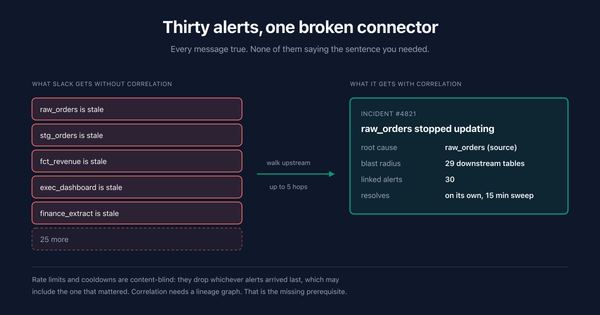
The cost shows up in one specific moment: an upstream table breaks, thirty downstream alerts fire, and somebody has to work out which one is the cause. Without a graph, that's reading alerts and grepping the dbt project. Call it 15 minutes of pure root-cause hunting before any fixing starts, which matches what I see on warehouses in the low hundreds of tables.
At a loaded engineering cost of $80 to $150 an hour, that's roughly $29 an incident at the midpoint. Twice a month puts it near $700 a year. Against a salary, that is a rounding error, and any vendor waving it at you is padding a business case.
The number that actually matters is a different one. Without a blast radius you find out your numbers were wrong when a stakeholder tells you. With one, you tell the stakeholder first. That difference does not appear in a spreadsheet and it is the entire reason to spend the 2 hours wiring this up.
Two honest caveats. The 15-minute figure is my estimate from watching teams triage, not a benchmark, and it scales with how many tables you have and how well you know them. If you own 24 tables and wrote all of them, lineage buys you very little; the value climbs steeply past the point where one person can hold the graph in their head. And a partial graph pays partial dividends, so a warehouse that is 40% dbt and 60% other pipelines gets you 40% of the way.
What the manifest cannot tell you
Four things, so you know what you're buying.
It is table-level. The manifest records that fct_revenue depends on stg_orders. It does not record which columns feed which. For incident triage that's fine, because when a table stops updating every column in it is stale. For "will renaming this field break anything," it's not enough.
It is structure, not health. The graph says stg_orders depends on raw_orders. Whether either is currently broken is a different system's job. The two together are what produce a blast radius you can act on; the graph alone is a diagram.
It does not know about your BI layer. The graph ends at whatever table feeds your dashboards unless you add those as nodes. Most teams don't, which means the last hop, the one your stakeholders actually see, is the one you're inferring.
It reflects the last upload, not reality. Worth repeating because it is the failure that actually happens.
None of that makes the manifest less worth uploading. It takes one command and it is the highest ratio of coverage to effort available in this category, which is a low bar and it clears it anyway. Just know what the graph is silent about, especially given how much of your quality signal comes from schema monitoring and tests that fail quietly rather than from lineage itself.
Should you upload one manifest or several?
A question that comes up once a project outgrows one repo, and the answer is less obvious than it looks.
dbt projects tend to multiply. A platform team owns the core project, an analytics team owns a second one that reads from the first, and somewhere there's a third that a single analyst maintains. Each produces its own manifest, and each manifest knows nothing about the others.
Upload them all. The graph is keyed by dbt unique ids, so a model in project A that reads from a source declared in project B produces two nodes that never connect, because the ids differ even when they point at the same physical table. You end up with two disconnected subgraphs that are each individually correct.
The join has to happen on the physical table, database plus schema plus name, which is why the table lookup matters more in a multi-project setup than a single-project one. If your projects declare the same warehouse table with different casing or a different identifier, they will not line up.
Practical advice: if you have one dbt project, none of this applies and you can stop reading this section. If you have three, upload all three, then deliberately test one cross-project dependency and confirm the graph connects it. If it doesn't, the fix is usually normalizing how the source is declared, not anything on the tool side.
The related trap is uploading the same project from two places, a developer's laptop and CI. Both succeed. The later one wins. If the laptop upload happens second and the branch was behind, you have just replaced a current graph with an old one and nothing anywhere will say so. Upload from CI only, and treat manual uploads as a debugging tool rather than a workflow.
Frequently asked questions
Where is the dbt manifest file?
target/manifest.json, relative to your dbt project root, after any parse, compile, or run. If the directory has both manifest.json and run_results.json, you want the first one.
Which dbt command generates a manifest fastest?
dbt parse. It builds the manifest from your project structure without compiling SQL or connecting to the warehouse, so it takes seconds and works in CI without warehouse credentials.
Do I need to change my dbt project to get lineage?
No. The manifest is a build artifact dbt already produces. There is no package to install, no macro to add, and no config block. That's the entire appeal.
Does the manifest include source tables?
Yes, under a separate top-level sources key rather than inside nodes. Any tool reading the manifest has to read both, and it is worth checking that yours does, since a graph missing its sources looks perfectly normal.
How often should I upload the manifest?
On every merge to main, wired into CI after dbt parse. Uploading by hand works until the first time somebody forgets, and a stale graph gives confident wrong answers rather than obvious wrong ones.
Will re-uploading duplicate my graph?
No. Uploads are diffed against what exists: new nodes and edges are created, existing ones updated, and relationships no longer present in the project are removed. It is idempotent, so re-running is safe.
What is the maximum manifest size?
50 MB of UTF-8 JSON. Most projects are far under it. If you're hitting the limit, check that you aren't uploading the wrong artifact.
Does dbt test coverage show up in lineage?
Test nodes are filtered out of the graph deliberately, since they're dbt infrastructure rather than data flow. Your tests still matter, they just aren't nodes.
Can I sync from dbt Cloud instead of uploading a file?
Yes. Provide your account id, a service token with "Read artifacts" permission, and a job id, and the manifest is pulled from that job's run artifacts directly. No file handling and no CI step.
What about tables not managed by dbt?
They will not appear. Define them manually through the nodes and edges endpoints if they matter, which is worth doing for a critical path and not worth doing for an entire warehouse.
Is table-level lineage enough?
For incident response, yes, because a stale table means every column in it is stale. For impact analysis before a column rename, no, and the manifest cannot give you that regardless of tooling.
Can I upload manifests from multiple dbt projects?
Yes, and you should if you have several. Each manifest is uploaded separately. Be aware that cross-project dependencies only connect if both projects declare the same physical table consistently, since dbt unique ids differ across projects.
How do I know my lineage graph is current?
Read generated_at in the response's manifest_metadata. That is the dbt generation timestamp, not the upload time, so it catches the case where somebody uploaded an old file from their laptop.