Using AI to Set up Schema Drift Detection
Set up schema drift observability in seconds
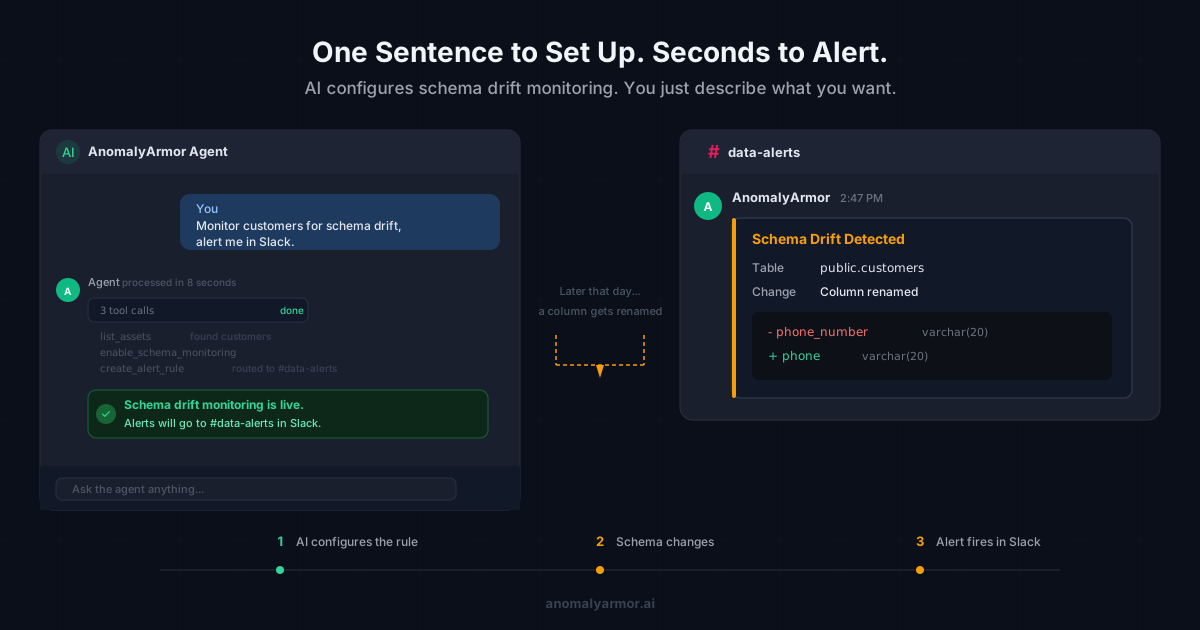
A column gets renamed. Your pipeline keeps running. Your numbers quietly go wrong. Nobody notices until a dashboard is broken and someone asks why.
That's schema drift. It's one of the most common causes of silent data failures, and most teams don't find out until the damage is done. And we can prevent that with a few seconds of effort.
Here is a video of setting up schema drift in seconds...
Step 1: Tell the AI to Create a Schema Drift Rule
I open the agent and type a single sentence. The agent finds the table, creates a schema drift monitoring rule, and routes alerts to my Slack channel.
No clicking through settings pages. No YAML config. One sentence, monitoring is live.
Step 2: Trigger the Alert
A schema change happens. This is the kind of thing that occurs all the time in production. A vendor renames a field. A teammate refactors a table. An upstream migration runs. Nobody sends a memo.
AnomalyArmor detects the change and fires the alert rule we just created.
Step 3: Slack Lights Up
My Slack channel gets a notification. The alert tells me exactly what changed. Not a vague "something changed in your warehouse." The specific column, the specific table, the specific change.
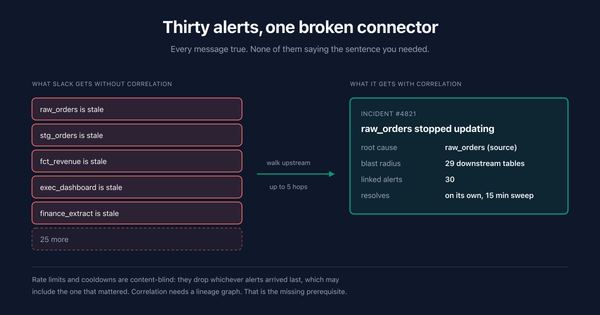
From here, I can investigate downstream impact: which dashboards, pipelines, or reports were affected? AnomalyArmor traces that too.
Why This Matters
Defining schedules, alerts and hooking up slack can be a chore. With AnomalyArmor, you can say what you want and have it done for you without the headache of crawling through technical docs on how to do it.
Many data teams fail to set up data observability because the cost to do that setup is too expensive. Data observability needs to be easy or it just gets deprioritized. With AnomalyArmor, say what you want and get it done.
Try It Yourself
Want to see what it catches in your warehouse? Connect a data source and set up your first rule. It takes about as long as reading this post. Sign in
Built by a data engineer who got tired of finding out about schema changes from angry VPs. Read the backstory.